Why Subjects Collapse When You Generate 3D From Multiple Views多視点で3D化すると、なぜ被写体が縮むのか
Feed TRELLIS.2 four orientations and the car's length collapses toward a cube.
The cause was not the orientation of the views but preprocessing that normalizes scale independently for each one.
The fix is to give every view a canvas of the same size and burn in a border the same color as the background.
Measured, the ratio of longest to middle axis went from 1.009 back to 2.108.
TRELLIS.2 に4方位の画像を与えると、車の全長が潰れて立方体に近づきます。
原因は視点の方位ではなく、前処理が視点ごとに独立してスケールを正規化していることでした。
対処は、全視点に同じ大きさのキャンバスを与えて、背景と同じ色の枠を焼くことです。
実測では、長辺と中辺の比が 1.009 から 2.108 に戻りました。
The Symptom — The More Views You Add, the More the Form Breaks 症状 — 視点を足すほど形が壊れる
While building a pipeline that raises 3D from multiple views, I hit strange behavior.
Feed it the front image alone and the result is fine.
Front plus back, also fine.
But the moment the left and right sides are added, the car's length collapses into something close to a cube.
At first I assumed I had the orientations wrong and tried many settings of front_axis.
None of them helped.
I also observed that isotropic subjects — small objects for 3D printing, say — did not break, which kept me from narrowing the cause for a while.
多視点から3Dを起こす経路を組んでいて、妙な挙動に当たりました。
正面の1枚だけを入れると正常に出ます。
正面と背面の2枚でも正常です。
ところがそこへ左右の側面を足した瞬間、車の全長が潰れて立方体に近い形になります。
最初は方位の指定を間違えているのだと考えて、front_axis の設定を何通りも試しました。
どれも効きませんでした。
3Dプリント用の小物のように等方的な形の被写体では崩れないという観測もあって、しばらく原因が絞れずにいました。
The Cause Was Per-View Normalization 原因は、視点ごとの正規化にありました
Reading the wrapper's helper functions made it clear.
Preprocessing always passes each view through a square crop, and the size of that square is decided from the longest axis of the subject's bounding box.
In other words, for every view, that view's longest axis is normalized to occupy roughly 83% of the square.
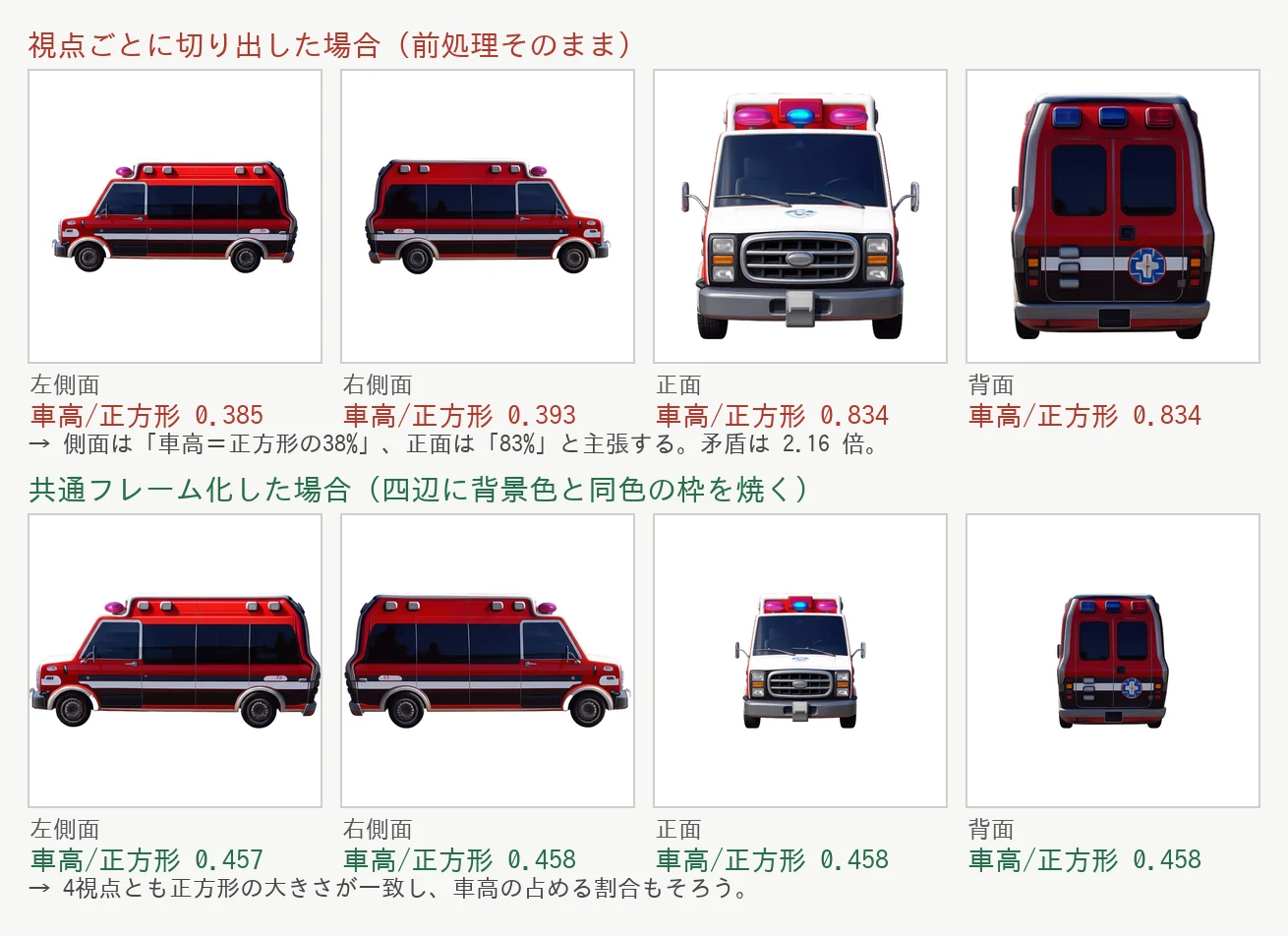
Measured on the ambulance: in the side view the longest axis is the vehicle's length, so its height came to 0.385 of the square.
In the front view the longest axis is the height itself, so it becomes 0.834.
For the same vehicle, the claim that its height is 38% of the square and the claim that it is 83% are fed in simultaneously.
The contradiction is a factor of 2.16, and the car with its length crushed out is what multidiffusion produced by averaging the two.
ラッパーのヘルパー関数を読んで分かりました。
前処理は視点ごとに必ず正方形の切り出しを通ります。
その正方形の大きさは、被写体のバウンディングボックスの長辺を基準に決まります。
つまりどの視点でも、その視点での長辺が正方形のおよそ83%を占める形に正規化されます。
救急車で測ると、側面ビューでは長辺が全長なので、正方形に対する車高は 0.385 でした。
正面ビューでは長辺が車高そのものなので 0.834 になります。
同じ車について、車高は正方形の38%だという主張と83%だという主張が、同時に入力されるわけです。
矛盾は 2.16 倍あり、multidiffusion がその両方を平均した結果が、全長の潰れた車でした。
Why Front and Back Alone Were Safe 正面と背面だけが安全だった理由
Once the mechanism is clear, every earlier observation is explained.
With a single front image there is nothing to contradict.
Front and back are both profile views whose longest axis is the vehicle's length, so they do not contradict either.
Only when the sides are added does the content of the longest axis switch from length to height.
Isotropic subjects survive for the same reason: if the longest axis measures the same from any direction, the normalization comes out consistent.
It was never a question of orientation, but of how anisotropic the subject's silhouette is.
この機序が分かると、それまでの観測がすべて説明できます。
正面の1枚だけなら比較する相手がいないので矛盾は起きません。
正面と背面はどちらも側面ビューで、長辺はどちらも全長ですから、これも矛盾しません。
左右を足したときだけ、長辺の中身が全長から車高へ入れ替わります。
等方的な被写体が崩れないのも同じ理由で、どの向きから見ても長辺の長さが変わらなければ、正規化の結果もそろいます。
方位の問題ではなく、被写体のシルエットがどれだけ異方的かの問題でした。
The Fix — Burn In a Border the Color of the Background 対処 — 背景と同じ色の枠を焼く
All the crop looks at is the alpha bounding box.
Given that, if every view gets a canvas of the same size with markers on all four edges that are guaranteed to fall inside the bounding box, the size of the square can be made uniform.
Make the markers the same color as the background and opaque only in alpha, and once composited they are indistinguishable from the background.
切り出しが見ているのはアルファのバウンディングボックスだけです。
だとすれば、全視点に同じ大きさのキャンバスを与えて、その四辺に必ずバウンディングボックスへ入るマーカーを置けば、正方形の大きさをそろえられます。
マーカーの色を背景色と同じにして、アルファだけを不透明にすると、合成後の見た目は背景と区別がつきません。
There are four steps.
Take the alpha bounding box of each view.
Next, bring the vehicle's height — the quantity invariant across the four horizontal orientations — to a common value.
Then decide a common canvas edge from the widths and heights of all views, and place the subject's center at the center of the canvas.
Finally, burn a two-pixel border into all four edges.
手順は4つです。
各視点のアルファのバウンディングボックスを取ります。
次に、水平4方位で不変な量である車高を共通の値へそろえます。
そのうえで、全視点の幅と車高から共通のキャンバス辺を決めて、被写体の中心をキャンバスの中心へ置きます。
最後に四辺へ2ピクセルの枠を焼きます。
Measured — 1.009 Came Back to 2.108 実測 — 1.009 が 2.108 に戻りました
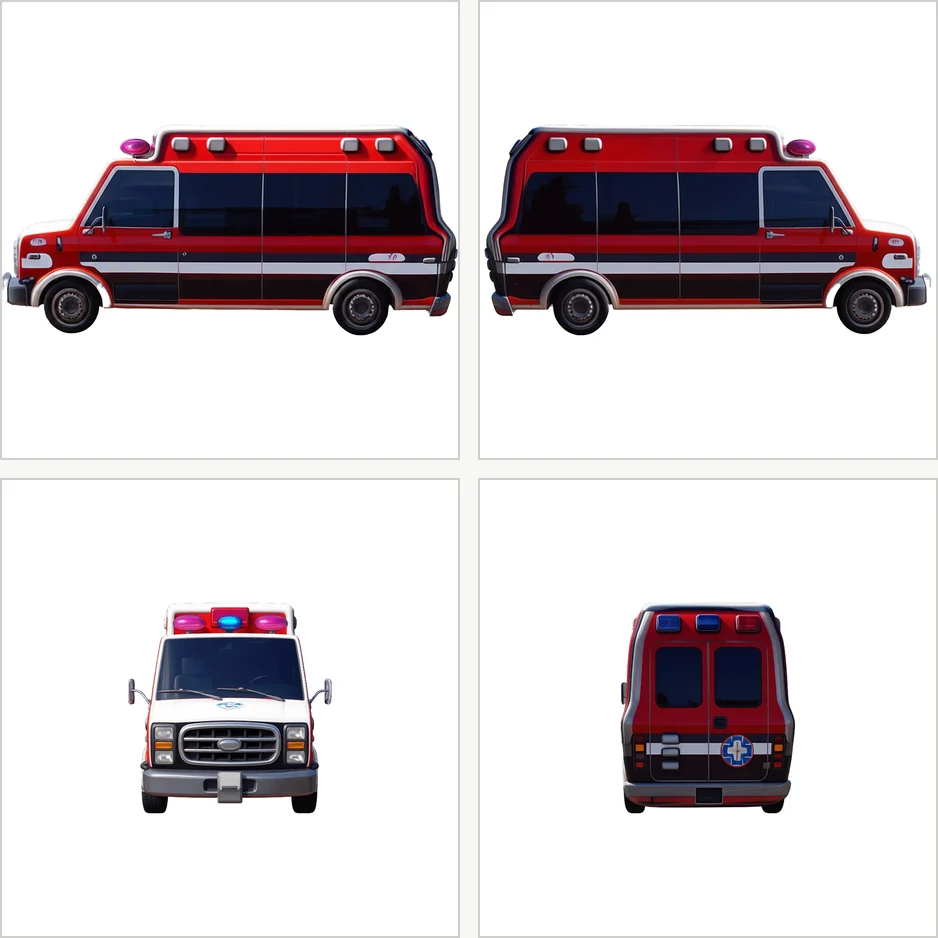
Same model, same prompt, same seed, compared before and after common framing.
Measuring the bounding box of the output GLB, the ratio of longest to middle axis before the fix was 1.009 — a perfect cube.
After the fix it was 2.108.
Since the reference 2D profile has an aspect ratio of 2.16, the error is roughly 2.4%.
The only thing changed was the crop framing; the model, prompt, and seed were identical.
Common framing is not a nice-to-have step but one whose absence breaks the result.
同じモデル、同じプロンプト、同じシードで、共通フレーム化の前後を比べました。
出力された GLB のバウンディングボックスを測ると、対処前の長辺と中辺の比は 1.009 でした。
これは完全な立方体です。
対処後は 2.108 になりました。
参照となる2D側面図のアスペクト比が 2.16 ですから、誤差はおよそ2.4%です。
変えたのは切り出しの枠だけで、モデルもプロンプトもシードも同じです。
共通フレーム化は、あると良い工程ではなく、無いと壊れる工程でした。
What Was Given Up 捨てたもの
There is a cost.
The front and back views drop from occupying 0.80 of the square to 0.36.
Because a resize happens later in preprocessing, effective resolution along the front-back axis falls accordingly.
It is a trade: correct proportions in exchange for detail at the front and back.
I judged this to be the reasonable compromise.
Note that the texture stage uses only the conditioning from the profile view, so passing the unprocessed images through a separate path leaves texture quality unaffected.
代償もあります。
正面と背面のビューは、正方形に占める割合が 0.80 から 0.36 まで下がります。
前処理の後段でリサイズがかかるので、前後方向の実効解像度はそのぶん落ちます。
形状の正しさを取って、前後の細部を捨てる交換になっています。
私はこのあたりが妥協点だと判断しました。
なお、テクスチャの段は側面ビューの conditioning しか使わないので、加工前の画像を別系統で渡しておけば、テクスチャの品質には影響しません。
Laying Four Views on One Sheet Does Not Fix It 1枚のシートに4方位を並べても直りません
Worth stating as a common misconception: laying the four orientations out on a single sheet and matching their scale there does not fix this.
The crop runs independently per view, so however carefully you align things on the original sheet, normalization is reapplied after cropping.
Common framing has to be inserted not at the sheet-building stage but as post-processing after each view has been cut out as its own image.
Nor is the step specific to one implementation: putting the same material through Hi3D and Tripo, the common-framed source also produced results closer to the reference.
よくある誤解として書いておくと、4方位を1枚のシートに並べてスケールをそろえても、この問題は直りません。
切り出しは視点ごとに独立して走るので、元のシート上でどれだけ丁寧にそろえても、切り出したあとに正規化がかかり直します。
共通フレーム化は、シートを作る段ではなく、各視点を個別の画像として切り出したあとの後処理として入れる必要があります。
またこの工程が要るのは特定の実装だけではなく、Hi3D と Tripo に同じ素材を通したときも、共通フレーム化した素材のほうが参照に近い結果になりました。
If you use a multi-view route to raise 3D, I recommend putting this one step in before anything else.
Identifying the cause took time, but the fix itself is simple as image processing.
In my case I lost several days suspecting the orientation settings.
When the form collapses, it is faster to first read what the preprocessing uses as its reference on a per-view basis.
多視点から3Dを起こす経路を使うなら、この工程だけは先に入れておくことを勧めます。
原因の特定には時間を使いましたが、対処そのものは画像処理としては単純です。
私の場合、方位の設定を疑って何日か遠回りをしました。
形が潰れたときは、まず前処理が視点ごとに何を基準にしているかを読むほうが早いです。
Part of: このテーマの全体像: The Current State of AI-Generated 3D Creations AI 3D生成の現在地